
SlotsLV App: How to Get Slots.lv on Your Phone
You don’t need to install a SlotsLV app from the App Store or Google Play to play games at SlotsLV Casino.
Instead, you can open slots.lv in your phone’s browser, just like any other website. Then, create a home screen shortcut for the website. This shortcut opens and acts just like an app.
It’s a simpler way to access SlotsLV Casino from your phone. There’s no separate app file to install or maintain, though your browser may still store ordinary site data.
On this page, you’ll find installation instructions for both Android and iPhone, what to avoid when installing the SlotsLV app, and how your experience differs between desktop and mobile.
Jump to:
- See How It Works
- Add to Android
- Add to iPhone or iPad
- Avoid Fake APKs
- Set Up Mobile Play
- Compare Mobile vs Desktop
- Fix Common Issues
- Start Playing
- Get Quick Answers
What the SlotsLV App Actually Is
The SlotsLV app is a home screen shortcut that you install from your browser menu. From this icon, you launch the full-screen mobile casino, which scales to size and functions just like an app.
That’s why you won’t find a SlotsLV download option listed in the App Store or Google Play. You don’t need one.
We don’t use a traditional app store-style app because it’s simpler. There are no app files to install, no background data running from a separate application, and no second account or login to manage. You use the same SlotsLV account you already use on desktop.
Once added, the SlotsLV icon appears on your home screen alongside your other apps and opens the mobile site when you tap it.
Depending on the browser you use, you’ll follow slightly different steps to install the SlotsLV casino app, as shown in the next section.
How to Download the SlotsLV App on Android
You can add the SlotsLV home-screen shortcut for free through your Android browser.
Follow these steps on Chrome:
- Open the Chrome browser and go to slots.lv.
- Open the browser menu with the three dots at the top right.
- Towards the bottom, tap “Install and create shortcut.”
- Select “Create shortcut.”
- Tap “Add” to place the shortcut on your home screen.
The SlotsLV icon should now appear on your home screen. Tap it whenever you want to open the casino from your phone.
On other Android browsers, such as Samsung Internet and Firefox, look for a similar “Add to Home screen” option. The menu location and wording may differ.
How to Download the SlotsLV App on iPhone and iPad
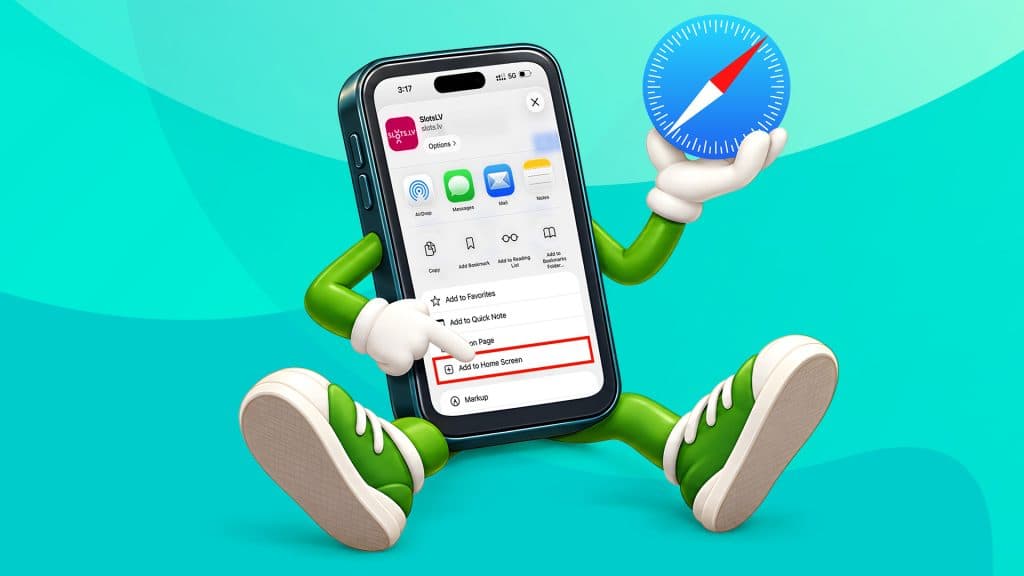
Follow the steps below if you’re using an iPhone or iPad:
- Open Safari and go to slots.lv.
- Open the Share menu with the icon in the browser controls. If you have a newer layout, you may need to open the Page Menu first and then tap Share.
- Scroll down the Share menu and tap “Add to Home Screen” toward the bottom.
- If prompted, turn on “Open as Web App,” then tap “Add” to confirm.
The SlotsLV icon will appear on your home screen and open the casino like a regular iPhone app when you tap it.
Use Safari for this setup on iOS. Chrome on iPhone handles website shortcuts differently and does not follow the same install route.
Fake SlotsLV APKs: What to Avoid
SlotsLV Casino does not offer an official APK file. An APK is the file format Android devices use to install apps outside of Google Play. If a website offers a SlotsLV APK to download, we didn’t provide it, and the site isn’t connected to the casino.
You may encounter these listings from time to time because third-party download sites target search terms such as “slots lv app” and “slots lv download” to attract more viewers.
Avoid these files.
They come from an unknown source, and you can’t verify what code they contain. They’re not linked to your SlotsLV account, so you may end up entering your login details into software or a website that we don’t control.
To stay on the official route:
- Do not download a SlotsLV APK (we do not offer one) or SlotsLV software from a third-party site.
- Do not enable installation from unknown sources to install one.
- Add the home-screen shortcut only after opening the official SlotsLV site in your own browser.
The only official way to install the SlotsLV Casino browser app is via slots.lv in your device’s browser.
If you want to check the casino itself before creating an account, our guide, “Is SlotsLV Legit?” covers our specific licensing, regulation, and security information in more detail.
Setting Up Your SlotsLV Mobile Session
Try landscape mode if a game feels cramped in portrait. Some slots play better vertically, so use the orientation that best fits the game on your screen.
Finding Games
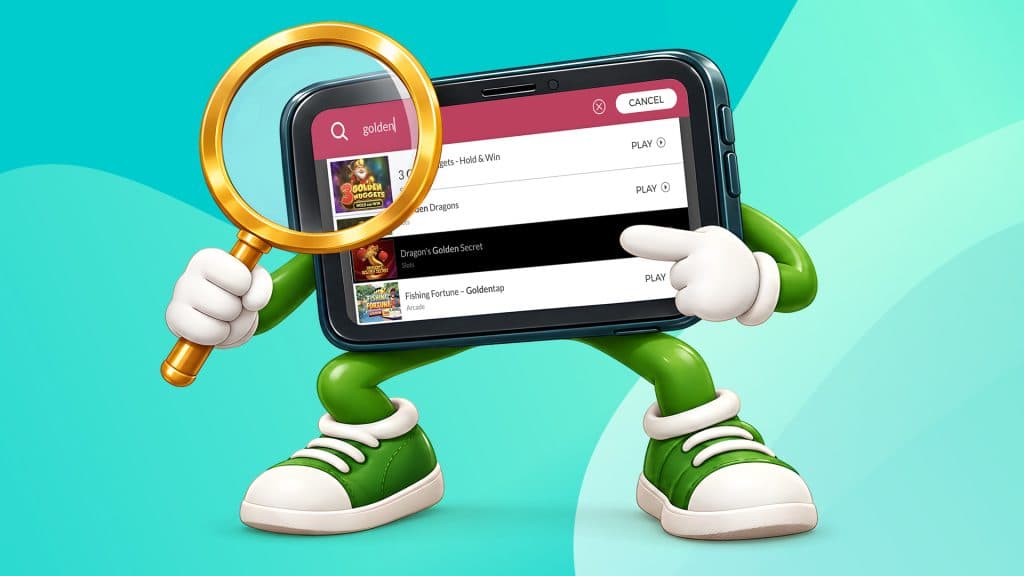
You can easily locate any game. From the SlotsLV Casino home page, tap the magnifying glass on the top left. Type the name of your game, or specific words from the title, into the search bar. A list of games with that word or the exact title will appear. Select your game to open it immediately.
You can also find games manually using our page categories.
Scroll down until you find the long grey bar. Slot and table-game categories are listed here. You can scroll the grey bar horizontally with your finger while the rest of the page remains in place.
Full-screen Play
Most phones automatically hide phone and browser controls once you enter a game and start playing, and return them when you tap or swipe on the edge or corner of the screen.
On the SlotsLV app, tap the dark grey mini arrow in the top right corner to hide our site menu. Tap the same place again to bring the menu down and either exit your current game or make a deposit.
Updates
Luckily, you don’t have to worry about updates when using the browser-based SlotsLV app. The shortcut leads to the live site, and we update it automatically; you don’t have to maintain anything.
SlotsLV Mobile App vs Desktop: What Changes
The SlotsLV mobile site gives you access to your usual account, promotions, payments, and support. The main difference is how the layout adapts to your screen.
| Mobile home-screen app | Desktop browser | |
| Game library | Mobile-compatible games | Desktop-compatible games |
| Jackpot games | Available | Available |
| Bonuses and promotions | Same offers and rewards | Same offers and rewards |
| Deposit methods | Same available methods | Same available methods |
| Withdrawal process | Same request and approval process | Same request and approval process |
| Live support | Available from the same chat bubble | Available from the same chat bubble |
| Device storage used | No separate app files; normal browser data | Normal browser data |
| Updates | Automatic | Automatic |
Slot Machine Selection
You can browse SlotsLV’s slot games, including jackpot titles, on both desktop and mobile. The layout adapts to fit your phone or tablet, although individual games may display differently depending on the device.
If you mainly play from your phone, our guide to the best mobile slots can help you find titles that work particularly well on a smaller display.
Bonuses and Rewards
You don’t sacrifice any bonuses or rewards by playing on mobile either. You can access the Welcome Bonus and other promotions in the same way and with the same value from the mobile app.
From the SlotsLV casino app, tap the three horizontal lines at the top right. Towards the bottom, tap “Promotions” to read more about the bonuses and rewards available.
Deposits
To make a deposit through the SlotsLV mobile app, tap the icon with a transparent coin and a downward arrow in the top right of the screen. Follow the prompts to select your deposit method and fund your account. The same methods are offered on the desktop as on the mobile site.
You can also tap the profile icon, which displays options for both a deposit and a withdrawal.
Withdrawals
The withdrawal process through the SlotsLV mobile app is the same as on desktop, including the available withdrawal methods.
Tap the profile icon and select the white button that says “Withdraw.” Follow the prompts to select your withdrawal method and the amount.
Our guide on how to withdraw money from an online casino walks through the process in more detail.
Support
If you need help, you can contact support through the SlotsLV mobile app. Tap the pink speech bubble at the bottom right of the screen. This opens a form where you can enter your information and the reason for contacting support, then start a chat with a SlotsLV representative.
For a closer look at the practical differences between the two formats, see our guide to mobile casinos vs desktop.
SlotsLV App Troubleshooting
Because the SlotsLV app runs through your browser, most problems come down to your connection, browser, or home-screen shortcut, rather than the casino itself.
- Game not loading: Refresh the page first. If that doesn’t work, close the game and reopen it from the lobby.
- Slow or laggy play: Check your internet connection. If you’re using WiFi, switch to data, and vice versa. If the game is still sluggish, close other browser tabs or apps running in the background.
- Blank or frozen screen: Fully close the browser or home-screen app, then reopen SlotsLV. If the problem continues, clear your browser cache and try again.
- Shortcut not opening: Delete the shortcut from your home screen and add it again from the official SlotsLV site. You can also open SlotsLV directly in your browser to check whether the shortcut itself is the problem.
If the problem persists, contact SlotsLV support for further assistance.
Start Playing SlotsLV on Mobile
Open slots.lv in your phone’s browser and add a home-screen shortcut. The icon gives you quick access to the mobile site, without an App Store or Google Play download or separate app installation.
From there, you can browse the mobile game library and use the same SlotsLV account, features, and promotions available on desktop.
SlotsLV App FAQs
Is there an official SlotsLV app on the App Store or Google Play?
No. SlotsLV does not offer an App Store or Google Play download. Add a home-screen shortcut from the official slots.lv site instead.
Is the SlotsLV app safe to use?
Yes, when you add it from the official SlotsLV site. You’re not installing an APK or other app file, so there’s nothing to sideload or scan. The shortcut simply opens the live mobile site in your browser.
Does the SlotsLV app take up storage on my phone?
Not as a separate app. The shortcut doesn’t install app files, but your browser may still keep normal cache and site data when you use SlotsLV.
Can I use the SlotsLV app on both Android and iPhone?
Yes. You can add SlotsLV to the home screen on both Android and iPhone. Follow the steps in the relevant installation section above.
Are the same games and bonuses available on the mobile app?
You can access SlotsLV slots, jackpot games, table games, bonuses, promotions, and rewards on mobile. Individual game compatibility may vary by device, but your account and offers remain available.
How do I withdraw my winnings from my phone?
Tap on the profile icon, and select the white button that says, “Withdraw.” Your withdrawal options, request and approval are identical to those on desktop.
Why won’t the SlotsLV app open on my phone?
Try opening SlotsLV directly in your browser first, then delete and re-add the home-screen shortcut if needed. If that doesn’t fix it, check the troubleshooting section above for browser, connection, and cache fixes.
Pretty much the coolest part of living in this day and age is being able to play slot games on your phone, and SlotsLV Casino is right there with you.
However, our app experience works a little differently.
Unlike regular apps, which you download from the App Store or Google Play and install on your device, the SlotsLV app isn’t a traditional download.
Instead, it’s a home-screen shortcut to our mobile website. You add it directly from your browser, and it opens just like an app, giving you quick, one-tap access to the full casino experience.
Sound like a plan, Stan? Let’s get into how to get it and how it works.
What is the SlotsLV Mobile App?
The SlotsLV app works as a shortcut to our regular casino that automatically opens like an app, scaling the games to your phone screen.
All of the games, bonuses, and features of the website are there, compact and tidy in the palm of your hand.
But as a shortcut to the website, our “app” doesn’t take up any storage on your phone with stored files, background data, and assets.
How to Download the SlotsLV App for Android
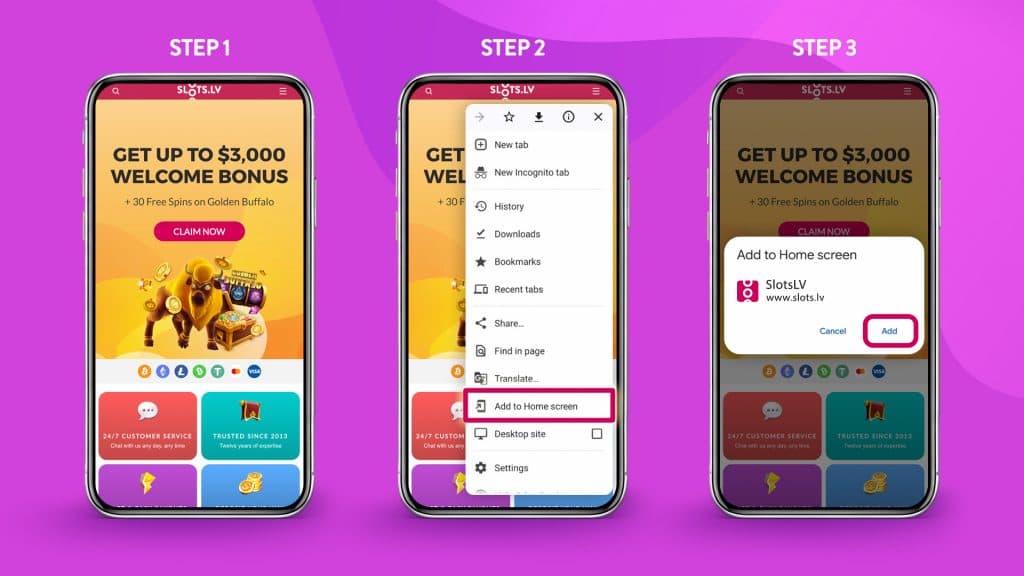
How do you get your fingertips on the slots.lv app? Follow these steps.
- Open slots.lv from your browser. Hi there! Good to see ya.
- Go to your browser’s menu and tap “Add to home screen.” If you’re using Chrome, it’s towards the bottom.
- Tap “Install.”
Now, you should have an icon with the SlotsLV Casino logo in your app drawer. That’s the SlotsLV mobile app, done and done.
How to Download the SlotsLV App for iOS
For Apple users, follow these steps to download the SlotsLV casino app.
- Open Slots.lv in Safari.
- Tap the share icon at the bottom of your screen.
- Scroll down and tap “Add to Home Screen.”
- Hit “Add.”
Now you’ll see the SlotsLV Casino icon sitting pretty on your home screen. Tap it, and you’re knee deep in action.
SlotsLV Casino App Features
Finding Slot Games
First things first. Unlock landscape mode on your phone. You’ll enjoy the app experience much more.
Now that’s out of the way, look for the magnifying glass at the top left of the screen. This is how you’ll search for games.
Type in any game you want to check out, be it a brand-new slot, a classic fave, or a game to try one of your top slot betting systems.
You could also tap on one of the theme categories in the gray banner to pick from our prearranged selection. You’re the boss here, so take the reins.
Full-screen Mode
Once the game loads, make sure you’re embracing the full experience before you get tap-happy on the ‘Spin’ button.
Are you in landscape mode? Good, because that’s the first step. Now, the game will automatically open in semi-full-screen mode, but you want to eliminate all distractions.
In that case, tap the arrow on the top right of the screen. This will hide the SlotsLV bar, deposit, and ‘back’ buttons, so you have the true full-screen view of your game.
If you want the bar back, tap the arrow again—yep, that teeeeny tiny one in the top right corner.
Updates
Since the SlotsLV app isn’t a traditional download, you might be wondering how to receive updates. We’ve got great news! That’s not your prob—that’s on us.
When we update the website, the update automatically applies to your homescreen shortcut, aka the SlotsLV mobile app. All you have to worry about is opening the app and having fun. Sweet deal.
SlotsLV App Experience
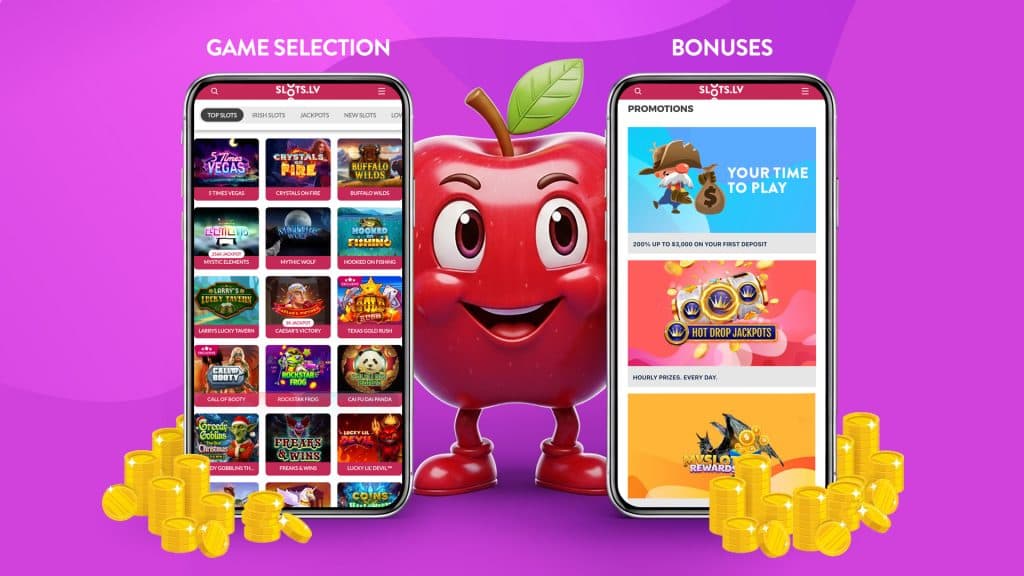
If you’re thinking the app must be missing handy features from the regular website, think again!
The Slots.lv app is a direct replica of the website, games, bonuses, and features. The only difference when it comes to desktop vs. mobile is the convenience. Let us show you what we mean.
Game Selection
You trust us for having the most elite game selection online, and it’s no different when you open SlotsLV in our app or on a regular desktop browser. But now, the SlotsLV mobile games are scaled to your screen.
The front page is an endless scroll of themes and characters, from Julius Caesar beckoning you to the Colosseum to a mysterious wolf howling at the moon.
Although the app shows a more compact layout with smaller icons and text to fit your screen, we haven’t skimped out on any games. What you see on your desktop is what you see on your phone, including progressive jackpot slots and Hot Drop Jackpots.
Top Tip: All our slot games are also available on demo – meaning you can play free mobile slots in your browser.
Bonuses
Hundreds of players take advantage of SlotsLV bonuses every day, and we’re delighted to share. Accessing a bonus through your phone is no different.
At the top right of the screen, tap on the hamburger icon, and then “Promotions.” Open it up and…yep—no surprise there!
You still have access to the Welcome Bonus, MySlots Rewards, Crypto Club, and Refer a Friend bonus.
Nothing changes just because you’re grabbing a bonus from the app. Well, maybe one thing changes: it’s a great deal more convenient. And we love that.
Deposits
It’s easy to deposit on the SlotsLV website, and just as easy to do so on the mobile app. Simply head to the cashier, hit “Deposit,” and select your method. Hint: crypto deposits are always the fastest.
Follow the instructions to deposit your cash as always, and get on your merry way to play.
Withdrawals
What happens if you win a massive prize from the phone app instead of the website? Are you in big trouble? Not a chance.
All of your winnings on the phone work exactly the same as your winnings on your laptop or computer. To receive your proud payday, tap the profile icon in the top-right corner, then request a withdrawal from the cashier.
You’ll glide through the same process of selecting your withdrawal method, entering the amount you’d like to take home, and submitting the request for approval. Nothin’ but smooth sailing.
Support
Of course, issues might arise from time to time. At the end of the day, we’re all humans navigating a world of technology. If you’re on your phone, you’re not lost—we got you.
Look for the little pink speech bubble in the bottom-right corner of the screen. That’s how you contact us for support.
Tap it, jot down some details about your account, and share the details of how we can help you. A real human will get back to you ASAP to help resolve the issue.
SlotsLV Mobile App: Troubleshooting & Safety
SlotsLV keeps your account and payments locked down, but you still have a role to play, especially when you’re using a browser-based app.
If something isn’t loading right or a download link looks off, you’ll want to know what’s normal and what’s not.
Below is how to fix common issues and avoid anything sketchy while you play. This is the internet, after all. ‘Nuff said.
Common Fixes
If something feels off while navigating the app, it’s usually a quick n’ easy fix. Since the app runs in your browser, most issues stem from your connection or settings, not the platform itself.
Here are some common errors you might encounter.
- Game not loading. Refresh the page or close and reopen the shortcut, aka the SlotsLV app.
- Slow or laggy. Check your Wi-Fi and do the on-and-off-again dance. If that doesn’t work, switch to mobile data.
- Blank screen or freezing. It’s worth checking whether your browser is up to date.
- Shortcut not working. Delete it and add it back from your browser. It takes just a few seconds.
Fake SlotsLV “APK” Warnings
If you see a site telling you to download a SlotsLV APK, stop right there. That’s not how this works.
SlotsLV does not have a downloadable Android app. There’s no APK file, no install screen, and nothing you should be sideloading onto your phone. The only official way to use it is through your browser or by adding the site to your home screen as a shortcut.
The following safety tips are essential.
- Avoid any APK downloads claiming to be SlotsLV. It’s not us!
- Stick to the official website only
- Never enable “Install unknown apps” just to access the casino. You won’t have to do that for the real SlotsLV mobile app.
Do you have your phone on you? Great! Then you’re ready to fire up the SlotsLV app and get playing.
Everything on the app works the same as it does on desktop, but now, you can play your favorite games from anywhere. Go ahead—download the shortcut from your phone’s browser, open it up, and explore the wide, wonderful world of SlotsLV.
SlotsLV Casino Mobile App – FAQs
Is there a real SlotsLV app I can download?
Nope. The Slots.lv app is actually a shortcut to our regular website on your phone. However, it functions just like an app would.
How do I install the SlotsLV app?
Open slots.lv on your phone’s browser. Tap the browser menu and select “Add to Home Screen.” It appears as an app icon in your app drawer.
Does it have all of the same features as the website?
100%. The SlotsLV mobile app is a direct replica of the website. You have access to the same games, bonuses, and features. You won’t miss a thing.
Does it take up storage on my phone?
Barely any. Our app is just a shortcut. It’s not a full APK download with stored files, background data, and app assets taking up space on your device.
Can I use it on both Android and iPhone?
Definitely, we don’t play favorites. The app works the same way, regardless of your phone type.